Adobe Photoshop Skills in Ghana: 7 Skills That Earn Real Money
A few months ago a former student of mine, Efya, rang me from Kasoa. She was breathless. Nothing had gone wrong — a stranger in Canada had just paid her…

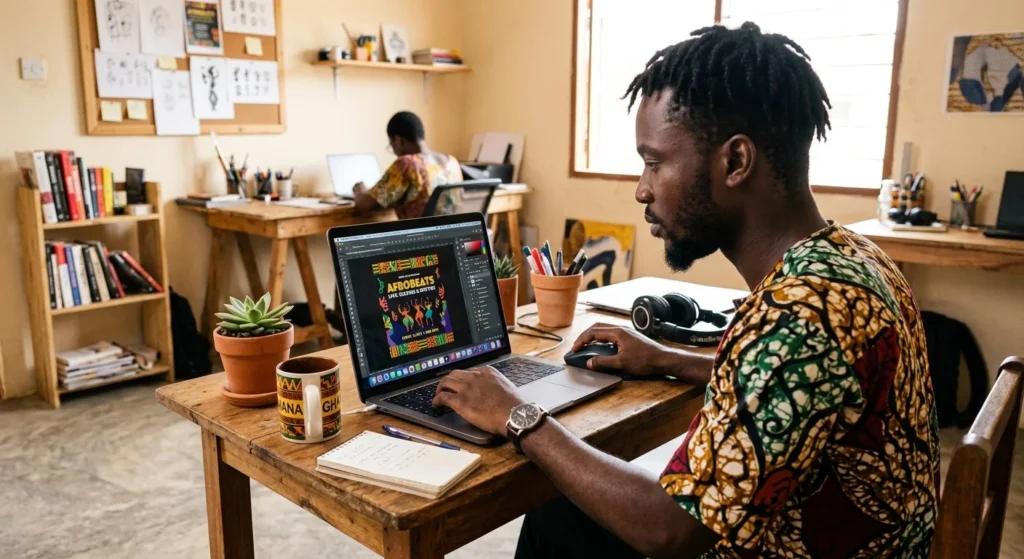
A few months ago a former student of mine, Efya, rang me from Kasoa. She was breathless. Nothing had gone wrong — a stranger in Canada had just paid her $40 for a flyer she’d designed on her phone.
“Forty dollars,” she kept saying. “For one flyer.”
Efya had stumbled onto something a lot of creative Ghanaians are working out at the moment. Adobe Photoshop skills in Ghana aren’t a hobby any more. They’re one of the shortest routes to online income I know of, and the barrier to entry is almost nothing — no degree, no office, not even your own laptop, at least to start. What you do need is genuine skill in the software, some feel for layout, and enough patience to keep practising when your early work looks rough.
I’m writing about Photoshop specifically here. Canva has its place and I’ll come back to that later, but the designers charging serious money are almost all working in Adobe. If you’d rather be quoted $40 or $100 for a job than $5, this is the software worth your evenings.
ToC
Table of Contents
Why Adobe Photoshop Skills Pay in Ghana Right Now
Every business around you needs design work. The salon on your street needs a price list. The church down the road needs a Sunday programme, every week, forever. The chop bar wants photos of its jollof that actually look like the jollof. The startup in East Legon needs a logo before it needs anything else. Build real Adobe Photoshop skills in Ghana and you become the person they ring.
Here’s the thing though — hardly any of them can afford a designer on staff. What they can afford is GH₵150 to GH₵500 for a flyer. Maybe GH₵300 to GH₵1,000 for a logo, depending on who you’re talking to and how established they are. A set of social posts might land somewhere around GH₵200 to GH₵600. Those numbers aren’t spectacular on their own. They add up quickly when you’re reliable, and reliability is rarer than talent in this business.
Then there’s the freelance platforms, which change the maths entirely. Fiverr and Upwork put you in front of buyers in the US, UK and Canada paying dollars. Efya’s $40 flyer was entry-level work — designers with a few years behind them quote $100 to $500 without blinking. Between the exchange rate and what it costs to live here, you don’t need many of those.
What people around you are actually buying
Event flyers dominate — church programmes, weddings, funerals, concerts, campaign posters during election season. Social media graphics come next: Instagram and Facebook posts, and a surprising amount of WhatsApp status design, which nobody outside Ghana would predict. After that it’s brand basics for small firms, meaning logos, business cards and letterheads. And there’s steady, unglamorous work in product retouching for people selling online who just need the background stripped out cleanly.
1. Understanding Layers — The Foundation of Everything
If you learn one thing, learn layers.
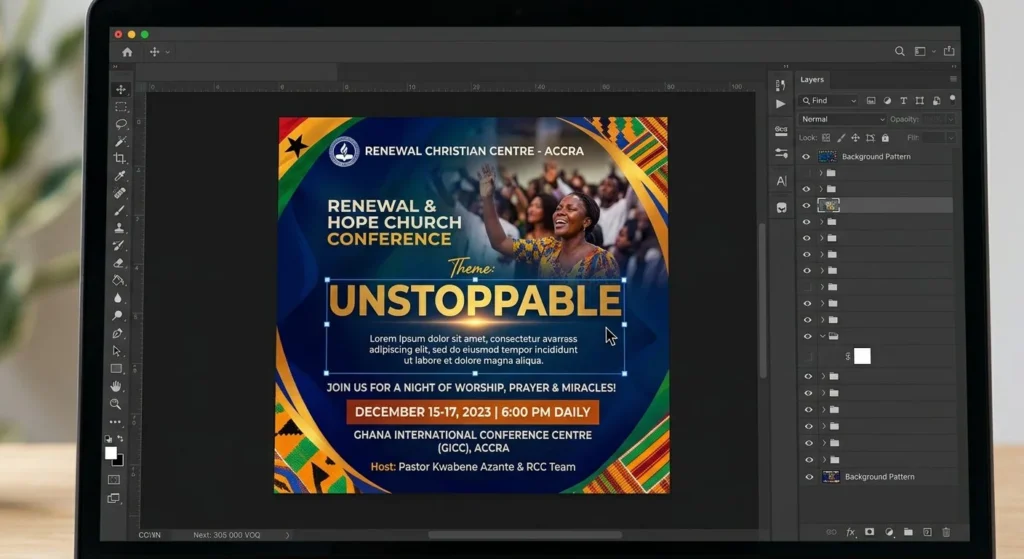
Everything in Photoshop sits on its own layer — text, photos, shapes, adjustments — stacked like sheets of tracing paper. The Layers panel over on the right is where you control what’s visible and what sits in front of what. It looks unremarkable. It’s the most important panel in the program.
Beginners nearly always make the same mistake, which is working flat. They drop text straight onto a photo, merge everything to tidy up, and then find they can’t shift the text without tearing a hole in the image. Don’t do that. Every element gets its own layer. Name them by double-clicking the layer name, and group the related ones with Ctrl+G so your panel doesn’t turn into forty items called “Layer 12 copy”.
This sounds like housekeeping. It’s actually the difference between professional files and amateur ones, and you’ll feel it the first time a client says “move the logo up a bit” and you nudge a single layer instead of rebuilding the whole design from scratch.
2. Selection Tools — Cut, Isolate, and Combine
Selection tools let you grab part of an image and work on it without touching anything else. The Rectangular Marquee and the Lasso handle simple shapes and you’ll pick them up in an afternoon. Two others matter far more for paid work.
The Quick Selection Tool, on the W key, lets you paint roughly over an area while Photoshop works out where the edges are. It’s how you strip a background out of a photo, which you’ll be doing constantly once flyers start coming in. If you want the design principles underneath all this first, my graphic design for beginners guide covers balance, contrast and colour theory — ideas that hold whether you’re in Photoshop, Canva or a sketchbook.
The Pen Tool is the other one, on P, and I won’t pretend it’s easy. It’s genuinely awkward for the first week or two. What you get in exchange is control down to the pixel, which is why anyone working on logos or product shots ends up living in it. Give it a few evenings. Once anchor points and curves click, you can cut out anything at all.
3. Typography — Making Text Look Professional
Bad type is the fastest way to announce you’re new at this. Letters jammed together. Five different fonts on one flyer. Text sitting on a busy photo with no contrast, so nobody can read the date of the event you were paid to advertise. These are the details that make a prospective client close your portfolio without saying why.
Two typefaces, maximum — one for headings, one for body. Make sure there’s real contrast between text and whatever sits behind it. Give lines room to breathe. And stop centring everything by default; it feels safe and it looks it.
Inside Photoshop the Character panel, under Window → Character, is where you’ll find tracking, leading and kerning. Space between letters, between lines, between specific awkward pairs. Learn those three and your text stops looking typed and starts looking set.
4. Colour Correction and Adjustments
Client photos almost never arrive usable. They come in too dark, or yellow from a fluorescent tube, or flat because someone shot them at noon. Colour correction is how you rescue them, and three tools handle the overwhelming majority of it.
Levels, on Ctrl+L, sorts out brightness and contrast. Hue/Saturation on Ctrl+U handles colour intensity. Colour Balance, Ctrl+B, kills the casts. That’s roughly nine fixes in ten.
One important habit: apply these as Adjustment Layers from the bottom of the Layers panel, not directly onto the image. The correction then stays live — you can tweak it next week, switch it off to compare, or bin it entirely without having damaged the original pixels. Get into that habit early, because unpicking a flattened, over-corrected file is miserable work.
5. Exporting Files for Print and Web
Designing the thing is half the job. Getting it out of Photoshop so it survives the printer, or the client’s phone, is the other half — and it’s where a lot of otherwise good work falls over.
For anything going online, export JPEG or PNG at 72 DPI and push it through Save for Web (Ctrl+Shift+Alt+S) to bring the file size down without visible loss. Print is different: PDF or high-resolution JPEG at 300 DPI. Sort your document size out before you start, too. An A4 flyer is 210 × 297 mm. Not whatever pixel dimensions felt about right when you opened the file.
A mistake I see most weeks — designers sending 50MB flyers that eat the client’s entire data bundle. A social post does not need print resolution. Match the file to where it’s going and your work will actually open when someone taps it.
Sizes worth memorising
Instagram posts are 1080 × 1080 px. Stories and WhatsApp status are 1080 × 1920. A Facebook link post wants 1200 × 630. All of those at 72 DPI, exported as JPEG. For print, an A4 flyer is 210 × 297 mm at 300 DPI, saved as PDF with 3mm bleed if the printer asks for it — most do. Business cards run 85 × 55 mm, also 300 DPI.
6. Creating Flyers and Social Media Graphics
This is the bread and butter. Church events, birthdays, product promos, campaign posters, and a steady stream of Instagram and WhatsApp status graphics. If you’re freelancing here, this work will pay your bills long before anything more interesting does.
A good flyer is clear before it’s clever. Someone glancing at it on a phone screen for two seconds should know what the event is, when it happens, where, and how to get in. Everything else — the gradients, the ornaments, the third font you were excited about — comes after that, if it comes at all. I’ve seen beautiful flyers that nobody could read the date on.
Build at the right dimensions from the start as well. Design at the wrong size and the feed crops it awkwardly, and even viewers who couldn’t explain what’s wrong will register that something is.
7. Building a Portfolio That Gets Clients
You don’t need paying work to have a portfolio. You need proof you can produce something clean, and nobody asks whether the client was real.
Two weeks is enough. Design three flyers for actual businesses near you — unasked, purely as practice. Then three social posts for a brand you like. Then one logo for a company you invent. That’s seven pieces, which is plenty to open a conversation. Put them in a tidy folder or set up a free Behance page.
So when someone asks whether you’ve done this before, you don’t say no. You send the work. The portfolio only gets you through the first gate — after that it’s the quality of what you deliver and whether you hit your deadlines that decides if there’s a second job.
How to Start Earning With Adobe Photoshop Skills in Ghana
The gap between learning this and getting paid for it is narrower than most skills. If you’ve read our roundup of ways to make money online in Ghana, you’ll know design keeps coming near the top — no capital, no stock, nothing to sell but what you can produce.
Roughly how it goes, if you’re organised about it:
Month one — learn the fundamentals
Layers, selections, type, colour. An hour a day is enough, provided it’s every day rather than five hours on a Saturday. Follow YouTube tutorials with Photoshop open next to the video and copy every step as it happens. Watching without doing teaches you almost nothing, which most people discover about three weeks in.
Month two — build the portfolio
Those seven pieces. Design for real local businesses even though nobody’s paying you yet. Post the work to your status — people notice more than you’d think. Tell your church, your barber, the cousin with the boutique.
Month three — start charging
GH₵100 to GH₵200 a flyer locally while you’re building up reviews, and get a Fiverr profile running for international work in parallel. The first client is the hard one; after that reviews compound and your rates follow your skill up. Efya never waited until she felt ready, for what it’s worth. She just started, and someone in Canada paid her within a few weeks.
For the wider picture of how people here are building freelance careers, our guide to freelancing in Ghana goes through the platforms, how to actually get paid, and the mistakes that cost people money early on. Several of our past students are now making GH₵1,000 to GH₵3,000 a month from design, some of them part-time while still in school. The demand is there. Practice is the variable.
And if you’re still choosing how to learn, our overview of computer training in Ghana covers what separates a decent centre from one that takes your money. YouTube is free, obviously. What it doesn’t give you is someone deciding what you learn in what order, and telling you when you’ve gone wrong.
A note on the figures above: these reflect rates we’ve seen among our students and local clients between 2024 and 2026. They’re illustrative rather than a promise. What you actually earn comes down to your skill, whether people can rely on you, and how hard you look for work.
Frequently Asked Questions
FAQ’s
Can I learn Photoshop without owning a laptop?
Harder, but people do it. A fair number of cyber cafés have Photoshop installed, and Photoshop Express on mobile is free — good enough to get the concepts into your head before you move across to the desktop version. None of what you learn goes to waste either, since layout, colour and type carry over between tools.
How long before I’m good enough to charge?
An hour a day gets most people to client-ready flyers and social graphics inside four to six weeks. They won’t win anything. They’ll be clean and worth paying for, and at the entry level that’s the whole bar.
Is Photoshop better than Canva for making money?
Depends what you’re being paid. Canva is quicker and perfectly good for straightforward jobs. But clients at the GH₵300-plus end for a flyer, or GH₵1,000-plus for a logo, generally expect Adobe work, and experienced buyers can spot a Canva template from across the room. Plenty of working designers use both — Canva when the turnaround is tight, Photoshop when the brief needs real control.
What computer do I need?
Not a new MacBook, whatever Instagram suggests. A Windows laptop with 8GB of RAM and a Core i5 or equivalent runs it fine. A lot of designers here start on a secondhand Dell Latitude or HP EliteBook picked up around Circle or Franko Trading for GH₵3,500 to GH₵5,000. If you’re choosing between more storage and more RAM, take the RAM — 8GB is really the floor. Adobe publish their official system requirements, worth a look before you hand over money.
How do I get my first paying client?
People who already know you. Your church needs flyers constantly. Your friend’s mother has a shop. Your cousin sells phone accessories and his photos are terrible. Do the first job free or nearly free, but make it genuinely good, because that one piece becomes both your portfolio and your reference. Almost every Ghanaian freelancer I know started this way — someone who knew someone — long before they ever touched Fiverr.
What can I realistically earn?
Working evenings and weekends off local clients, somewhere around GH₵500 to GH₵2,000 a month is normal. Full-time, mixing local and international work, people tend to land between GH₵2,000 and GH₵8,000. The designers with strong portfolios and established Fiverr profiles report GH₵5,000 to GH₵15,000 and up, though there aren’t many of them and they’ve been at it a while. Where you sit comes down to skill, reliability, and how actively you’re chasing work rather than waiting for it.
Do I have to pay for Photoshop?
Yes — Adobe sell it on subscription through Creative Cloud, billed monthly in dollars, with a seven-day trial. Use the trial and Photoshop Express while you’re learning, then treat the subscription as a business cost once money is coming in. Skip the pirated installers. Beyond the legal question, they’re a genuine security risk on a machine that’ll be holding client files and payment details.
Where to start tonight: pick a flyer from a business you walk past every day, redesign it properly, and post the before and after to your status. Do that for two weeks and you’ll have a portfolio — and usually your first enquiry — without ever having sat down to “build a portfolio”.
Hi, I’m Ovadia, the founder of Ovateq. I’m passionate about technology, digital skills, and helping people learn practical tools that can improve their careers, businesses, and everyday lives. Through Ovateq, I create beginner-friendly tutorials and educational content focused on Microsoft Office, digital literacy, website development, and modern tech skills. My goal is to make technology easier to understand and more accessible for everyone.